SQL functions in Google Sheets to fetch data from Datasette
I've been experimenting with ways to fetch data from Datasette and display it in Google Sheets.
I've found three patterns that work so far. importdata() and "named functions" can only fetch from public Datasette instances. Apps Script can fetch from API key protected instances as well.
The easiest way to get this up and running doesn't involve any custom sheets functions at all. The IMPORTDATA() default function can fetch any CSV data from a URL and load it into the sheet - and Datasette exports CSV by default.
- https://latest.datasette.io/fixtures/roadside_attractions.csv - the CSV data for the roadside_attractions table.
- https://latest.datasette.io/fixtures/-/query.csv?sql=select+pk%2C+name%2C+address%2C+url%2C+latitude%2C+longitude+from+roadside_attractions - a SQL export of a database query, in this case one that returns all rows from that table.
Either of these URLs can be used in a Google Sheets cell like this:
=importdata("https://latest.datasette.io/fixtures/-/query.csv?sql=select+pk%2C+name%2C+address%2C+url%2C+latitude%2C+longitude+from+roadside_attractions&_size=max")
Ideally I'd like to use =sql("SELECT ...") in my spreadsheet cells instead. Google Sheets lets you define new "named functions" on a per-sheet basis, which can use existing Sheets functions and formulas - including importdata().
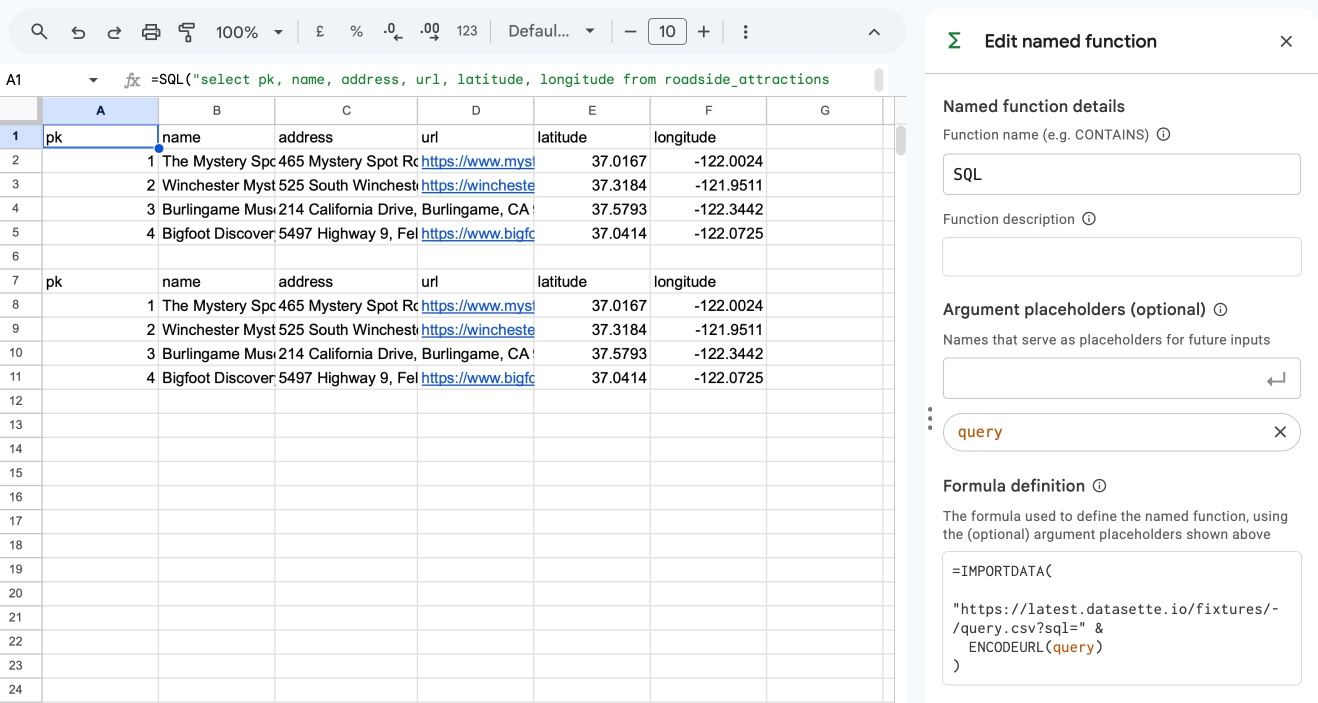
Go to Data -> Named functions and select "Add new function". Call it SQL and add a single argument placeholder called query, then set the following formula definition:
=IMPORTDATA(
  "https://latest.datasette.io/fixtures/-/query.csv?sql=" &
  ENCODEURL(query)
)
Now you can use =SQL("select * from roadside_attractions") in a cell to execute that SQL query and load in the CSV data:
There's one big downside of importdata() or a named function built on top of it: only unauthenticated URLs to CSV exports are supported. If your Datasette instance is protected by authentication and requires API keys to be sent as HTTP headers you will not be able to use them.
(importdata() can work fine here if the API key is a query string argument though. Here's how to enable that using the datasette-auth-tokens plugin.)
Apps Script lets you define custom server-side JavaScript functions which can then be called from a Google Sheets cell. These can be a lot more flexible, including sending API tokens in HTTP headers.
To create an Apps Script for a spreadsheet, use "Extensions -> Apps Script". This will start you on a code editor with a Code.gs file that you can edit. Here's a function definition for a =datasette_sql(query) custom function:
function datasette_sql(query) {
  var baseUrl = 'https://latest.datasette.io/fixtures'
  var token = '';

  // Strip a trailing slash so we control the join
  baseUrl = baseUrl.replace(/\/+$/, "");

  var url = baseUrl + "/-/query.json?sql=" + encodeURIComponent(query);

  var options = { muteHttpExceptions: true };
  if (token) {
    options.headers = { Authorization: "Bearer " + token };
  }

  var response = UrlFetchApp.fetch(url, options);
  var json = JSON.parse(response.getContentText());

  if (!json.ok) {
    throw new Error(json.error || "Query failed");
  }

  var rows = json.rows;
  if (!rows || rows.length === 0) return [["No results"]];

  var cols = Object.keys(rows[0]);
  var result = [cols];

  for (var i = 0; i < rows.length; i++) {
    var row = [];
    for (var j = 0; j < cols.length; j++) {
      var val = rows[i][cols[j]];
      row.push(val === null ? "" : val);
    }
    result.push(row);
  }

  return result;
}
You can set the base URL and an optional API token in variables at the top of the script.
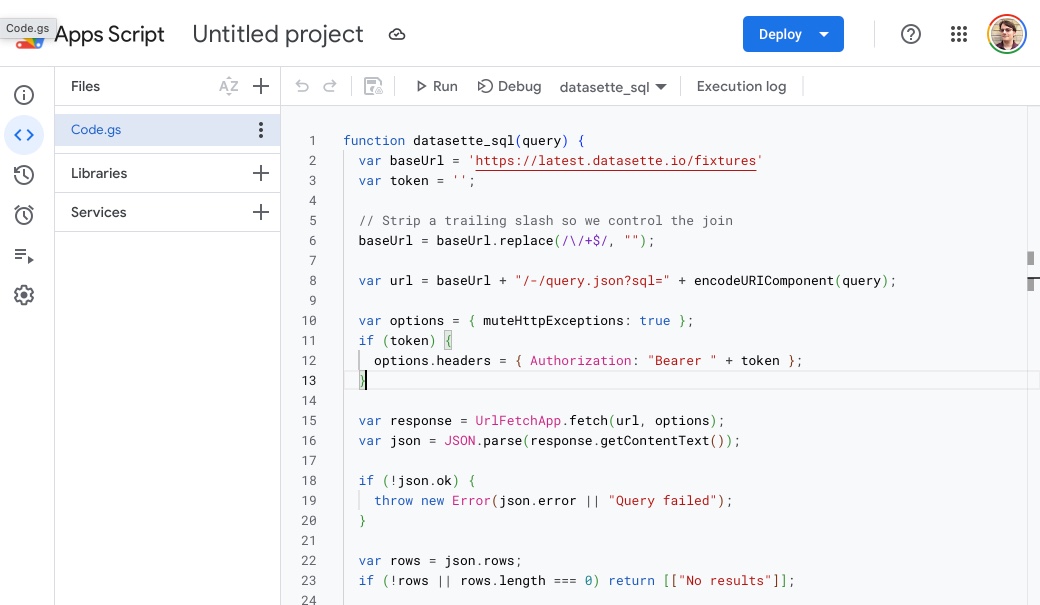
You can ignore that "Deploy" button entirely, it's not necessary for custom functions for sheets. I had to hit the Command+S key combination to save my changes - confusingly I could not find a "save" button in the editor UI.
Apps Script has a script and document properties mechanism which theoretically could be used to keep secret values separate from that code, but I wasn't able to get that to work without confusing permission dialogs popping up.
As far as I can tell users who have "view" permission but not "edit" permission on the spreadsheet are unable to view the source code, so it should be safe to keep read-only API tokens in the source code even for shared spreadsheets.
I've prepared this demo sheet showing all three of the above solutions - importdata(), a named sql() function and a datasette_sql() function defined using Apps Script.
Created 2026-04-19T19:33:58-07:00, updated 2026-04-19T19:52:54-07:00 · History · Edit